
Bhunaksha Rajasthan: How to Access the Official Land Map Portal at bhunaksha.rajasthan.gov.in
-
 By L. Sadriwala
- May 8, 2026
Introduction
Land ownership verification has become one of the most important steps before buying or selling property in India. In a state as vast and diverse as Rajasthan, accessing land maps and ownership records used to involve multiple visits to government offices, long waiting periods, and dependency on local officials. However, with the digitisation of land records, the process has become significantly easier and more transparent.
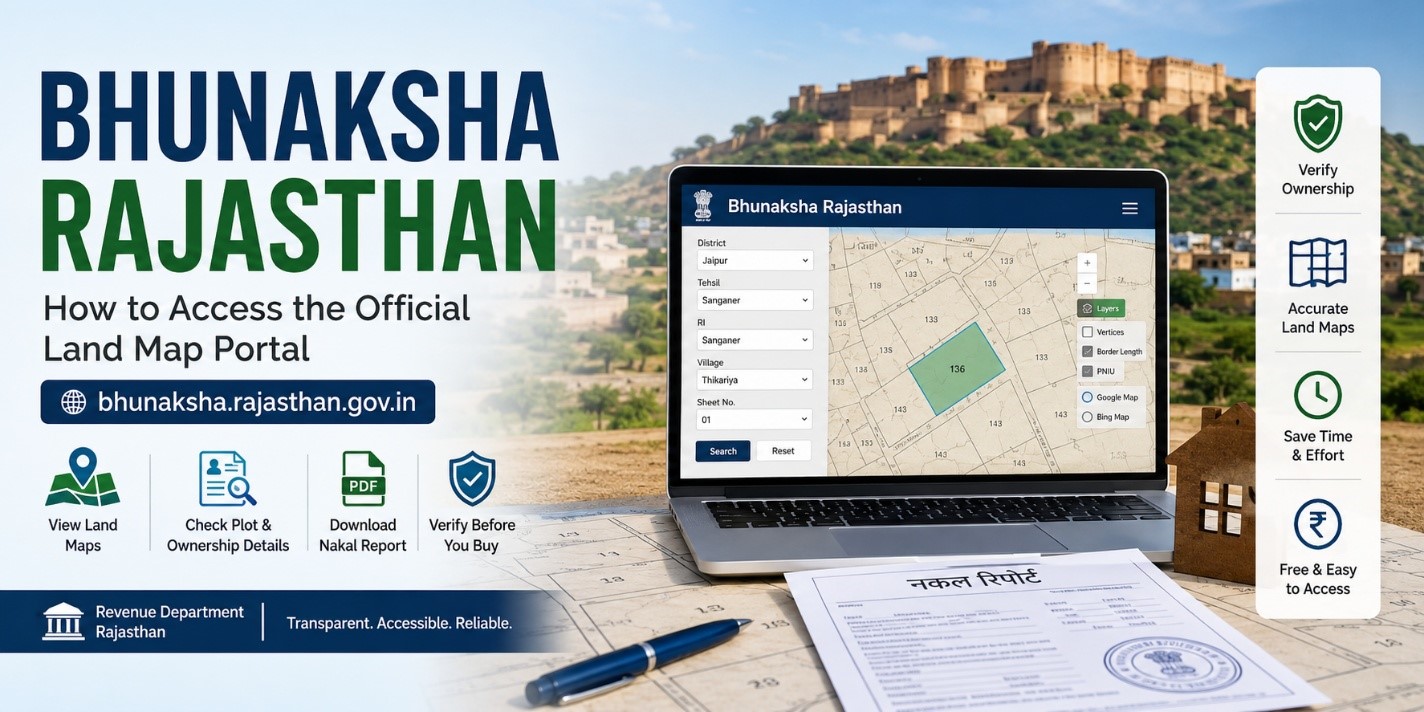
Bhu Naksha Rajasthan Official Portal is an online land map portal developed with the support of the National Informatics Centre (NIC) and managed by the Revenue Department of Rajasthan. The portal allows citizens to access land maps, plot boundaries, ownership-related information, and nakal reports directly from their homes.
The Bhunaksha Rajasthan portal plays a major role in improving transparency in land transactions. Buyers can cross-check ownership details before purchasing land, while landowners can verify the exact dimensions and boundaries of their plots. This digital system has also reduced the need to repeatedly visit Patwari offices for basic land map information.
Mumbai Mein Ghar Lena Hua Aasaan – Check Now!
Verified RERA Approved Projects in Mumbai at Best Prices. No Brokerage – Direct from Builder!!
Check Mumbai Projects →Whether you are a property buyer, landowner, investor, farmer, or someone involved in legal land verification, understanding how to use the Bhunaksha Rajasthan portal can save time, reduce confusion, and help prevent property-related disputes.
In this detailed guide, we will understand how the Bhunaksha Rajasthan portal works, how to check land maps online, how to download nakal reports, the benefits of the system, available districts, practical usage tips, and much more.
Also Read:- Bhu Naksha UP: Your Complete Guide to Checking Land Maps Online in Uttar Pradesh
What is Bhunaksha Rajasthan?
Bhunaksha Rajasthan is an online digital land mapping portal launched by the Revenue Department Rajasthan to provide citizens with easy access to land maps and plot-related information.
The platform enables users to:
- View land parcel maps online
- Verify plot boundaries
- Check ownership-related information
- Download nakal reports
- Access geo-referenced land records
- Verify land before the property purchase
The portal is especially useful for reducing fraudulent property transactions because it allows buyers to cross-check land details independently before investing in any property.
Quick Facts About Bhunaksha Rajasthan
| Particulars | Details |
| Portal Name | Bhunaksha Rajasthan |
| Managed By | Revenue Department Rajasthan |
| Developed With Support From | National Informatics Centre (NIC) |
| Main Objective | To provide online access to land maps |
| Beneficiaries | Citizens of Rajasthan |
| Services Offered | Land map viewing, nakal reports, geo-referenced maps |
| Access Mode | Online |
| Charges | Free of cost |
Why Bhunaksha Rajasthan is Important
Digitisation of land records has transformed the way property verification is done in Rajasthan. Earlier, citizens had to depend heavily on physical records and local officials. This often resulted in delays, confusion, and sometimes corruption.
The Bhunaksha Rajasthan portal solves many of these problems by offering transparent and publicly accessible land information online.
Also Read:- MP Bhulekh Web GIS 2.0 Portal Launched: Now Get Land Records on WhatsApp from Home
Some major reasons why this portal is important include:
Transparency in Property Transactions
Buyers can independently verify land ownership details before making payments or signing agreements.
Reduced Dependency on Middlemen
Citizens no longer need to frequently visit Patwari offices for basic land map access.
Better Boundary Verification
Landowners can accurately check plot dimensions and boundaries.
Easy Record Access
Important land information can be viewed and downloaded within minutes.
Improved Legal Clarity
Users can verify whether a land parcel has a government reservation, public utility allocation, or any visible legal concerns.
Ahmedabad Mein Sapno Ka Ghar – Ab Aasaan Hai!
Top RERA Approved New Launch Projects in Ahmedabad. No Brokerage – Direct from Builder!!
Find My Dream Home →How to Check Bhunaksha Rajasthan Online
Checking Rajasthan land maps online is a simple process. Follow these steps carefully.
Step 1: Visit the Official Website
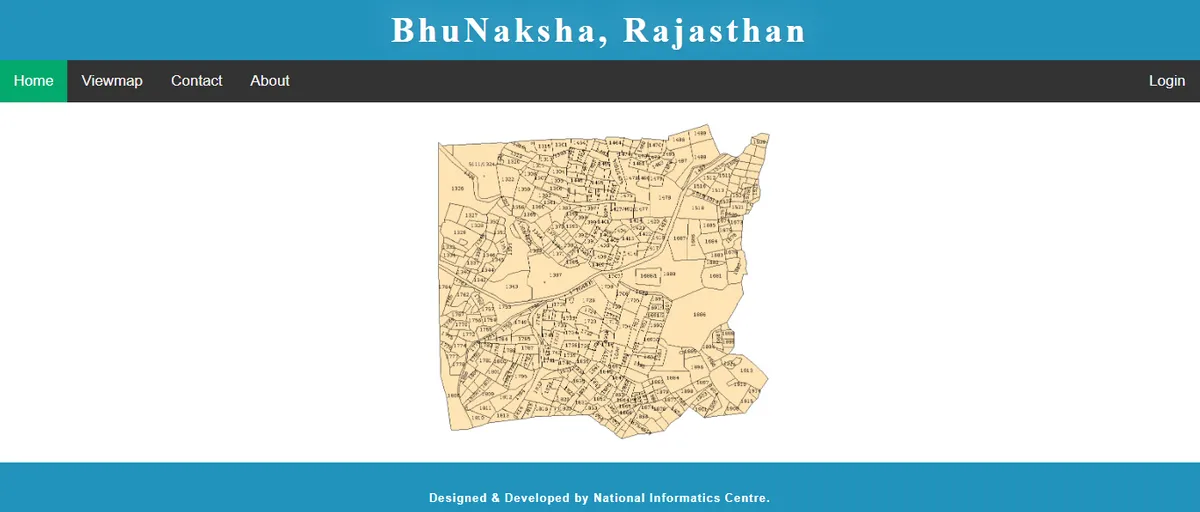
Open the official Bhunaksha Rajasthan portal.
Step 2: Enter Location Details
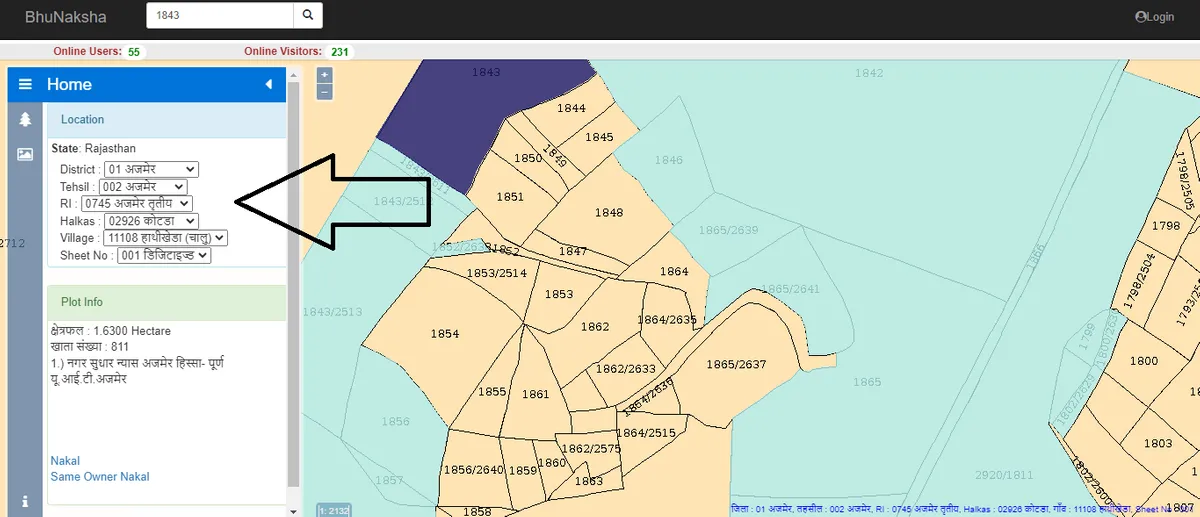
Select the following details:
- District
- Tehsil
- Village
- RI
- Sheet number (if applicable)
These details help the portal identify the exact land location.
Step 3: View the Land Map
Once the information is entered, the digital village map will appear on the screen.
Step 4: Select Plot Number
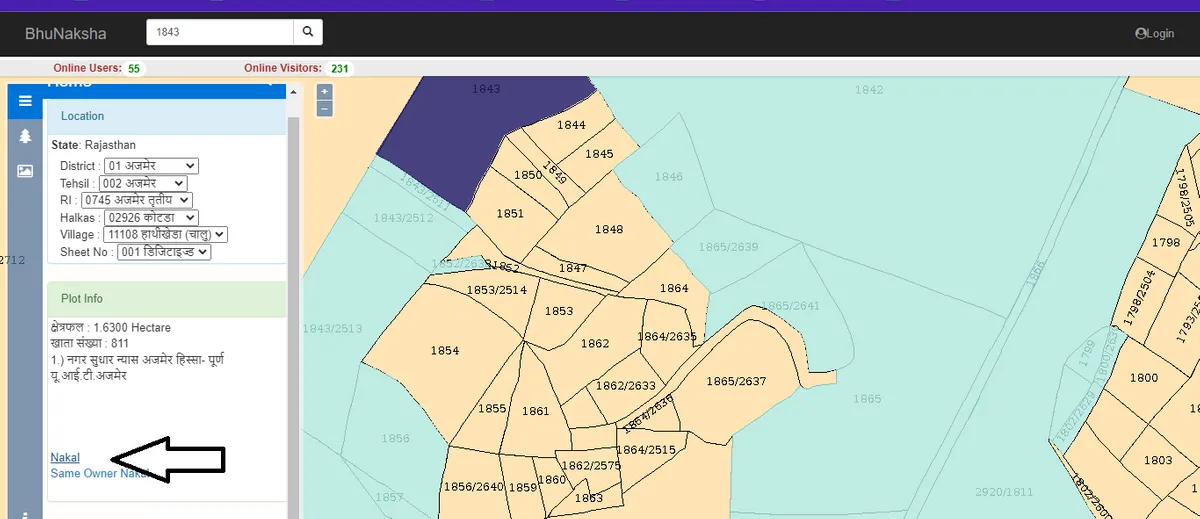
Click on the desired plot number displayed on the map.
After selecting the plot, detailed information related to the land parcel becomes visible.
Step 5: Access Plot Information
The portal will display important details such as:
- Plot number
- Khasra details
- Ownership information
- Plot boundaries
- Area measurements
Step 6: Click on Nakal
At the bottom section of the portal, click on the “Nakal” option.
Step 7: Generate PDF Report
Select “Show Report PDF” to generate and view the land record report online.
Gurugram: NCR’s Fastest Growing Real Estate Market!
Top RERA Verified Projects in Gurugram at Best Prices. No Brokerage – Direct from Builder!!
See Gurugram Projects →How to Download Bhunaksha Rajasthan PDF
Downloading land map records from the portal is also very easy.
Step 1: Open the Official Website
Visit the Bhunaksha Rajasthan portal.
Step 2: Enter Property Details
Provide details including:
- District
- Village
- Tehsil
Step 3: Select Plot Number
Click on the relevant land parcel from the map.
Step 4: Open Nakal Option
Click on the Nakal section available at the bottom.
Step 5: Generate PDF
Click on “Show Report PDF”.
The PDF file containing the land map and related details can then be downloaded and saved for future use.
Districts Available on Bhunaksha Rajasthan Portal
The Bhunaksha Rajasthan portal includes digitised land records from multiple districts across Rajasthan. Citizens from these districts can access land maps and related records online.
| S.No. | District Name | S.No. | District Name |
| 1 | Ajmer | 18 | Jhalawar |
| 2 | Alwar | 19 | Jhunjhunu |
| 3 | Baran | 20 | Jodhpur |
| 4 | Barmer | 21 | Karauli |
| 5 | Bharatpur | 22 | Kota |
| 6 | Bhilwara | 23 | Nagaur |
| 7 | Bikaner | 24 | Pali |
| 8 | Bundi | 25 | Pratapgarh |
| 9 | Chittorgarh | 26 | Rajsamand |
| 10 | Churu | 27 | Sawai Madhopur |
| 11 | Dausa | 28 | Sikar |
| 12 | Dholpur | 29 | Sirohi |
| 13 | Dungarpur | 30 | Sri Ganganagar |
| 14 | Hanumangarh | 31 | Tonk |
| 15 | Jaipur | 32 | Udaipur |
| 16 | Jaisalmer | 33 | Banswara |
| 17 | Jalor |
As digitisation progresses further, more records and map layers may continue to improve.
How to Access Geo-Referenced Land Records on Bhunaksha Rajasthan
One of the advanced features available on the portal is geo-referenced land mapping.
This feature allows users to compare land parcels with satellite mapping systems like Google Maps and Bing Maps.
Step 1: Visit the Official Portal
Open the Bhunaksha Rajasthan website.
Step 2: Enter Required Details
Provide:
- District
- Tehsil
- RI
- Village
- Sheet number
Step 3: Click on Layers
Locate the “Layers” option on the left-side panel.
Step 4: Enable Mapping Features
You can activate options such as:
- Vertices
- Border length
- PNIU
Step 5: Select Map Type
Choose between:
- Google Maps
- Bing Maps
Step 6: Open Geo-Referenced Map
Click on the search option to open the geo-referenced map in a separate window.
This feature is especially useful during:
- Property verification
- Land measurement checks
- Legal inspections
- Agricultural planning
- Infrastructure assessment
Same Owner Nakal Feature
The Bhunaksha Rajasthan portal also offers a “Same Owner Nakal” option.
This feature helps users access records of multiple properties owned by the same individual within a specific jurisdiction.
This becomes useful during:
- Property inheritance
- Family settlement verification
- Loan processing
- Legal due diligence
- Property portfolio management
Bhunaksha Rajasthan Mobile Application
Currently, the Revenue Department of Rajasthan has not launched an official mobile application for Bhunaksha Rajasthan.
However, several third-party applications are available on app stores. Citizens should exercise caution while using these apps because they are not officially associated with the Rajasthan government.
Users should avoid sharing:
- Aadhaar details
- Banking information
- Sensitive documents
- OTPs
- Personal credentials
For checking Rajasthan land maps, users generally only need:
- District name
- Village name
- Tehsil details
- Plot number
Using the official portal remains the safest and most reliable option.
Benefits of Bhunaksha Rajasthan
The Bhunaksha Rajasthan portal offers multiple advantages for citizens, landowners, buyers, and investors.
Easy Plot Boundary Verification
Users can visually verify the exact boundaries of a plot.
Better Ownership Verification
Ownership details help buyers conduct title verification before purchasing land.
Time-Saving Process
The online system eliminates repeated visits to revenue offices.
Reduced Corruption
Digitisation minimizes manual intervention and improves transparency.
Integration With Land Records
Users can access land maps alongside Record of Rights information.
Quick Download Facility
Land records and maps can be downloaded instantly in PDF format.
Better Legal Clarity
The portal helps identify government land allocations and potential legal concerns.
Free Government Service
The portal does not charge processing fees for accessing land map information.
Improved Accessibility
Citizens from rural and urban areas can access records from home using internet-enabled devices.
Documents and Details Required to Use Bhunaksha Rajasthan
No physical documents are required for basic land map searches.
However, users should keep the following details ready:
Property Location Information
- District name
- Tehsil name
- Village name
Plot Number
The plot number or khasra number acts as the unique identification number for the property.
Accurate details ensure faster and more reliable search results.
Practical Tips for Buyers and Landowners Using Bhunaksha Rajasthan
Using the portal correctly can help avoid mistakes during property transactions.
Keep Property Information Ready
Always note down the district, tehsil, village, and plot number before searching.
Verify Plot Boundaries Carefully
Compare the online map with the actual physical location of the land.
Download and Save the Nakal
Keep a copy of the PDF for future legal or banking purposes.
Cross-Check Ownership Information
Verify the owner name and land area with other official land records.
Avoid Third-Party Applications
Use only the official Bhunaksha Rajasthan portal for safer access.
Conduct Physical Site Inspection
Digital verification should always be combined with a physical property inspection.
Check for Missing Data
If a map or record is unavailable, visit the local revenue office or Patwari office for clarification.
Common Problems Users Face on Bhunaksha Rajasthan
Although the portal is highly useful, users may occasionally face certain challenges.
Slow Website Loading
- Heavy traffic or internet connectivity issues can slow down the portal.
Missing Plot Information
- Some records may still be under digitisation or pending updates.
Incorrect Land Details
- Older records may contain manual entry errors.
PDF Download Issues
- Browser compatibility or popup restrictions can sometimes affect PDF generation.
Difficulty Understanding Maps
- Some users may need assistance interpreting map layouts and khasra divisions.
How Bhunaksha Rajasthan Helps Property Buyers
Property buyers benefit significantly from digital land verification.
The portal helps buyers:
- Verify ownership claims
- Match boundaries with physical land
- Reduce chances of fraud
- Confirm plot measurements
- Conduct basic legal due diligence
This makes Bhunaksha Rajasthan an essential first-step verification tool before finalising land purchases.
Difference Between Bhunaksha and Traditional Land Verification
| Traditional Method | Bhunaksha Rajasthan |
| Requires office visits | Available online |
| Time-consuming | Faster process |
| Dependent on officials | Self-service access |
| Physical record dependency | Digital records |
| Higher risk of delays | Quick accessibility |
| Difficult for remote users | Accessible from anywhere |
Future of Digital Land Records in Rajasthan
Rajasthan’s digitisation initiatives indicate a strong push toward transparent governance and efficient land management systems.
In the future, the Bhunaksha Rajasthan portal may include:
- Better GIS integration
- Real-time land updates
- Mobile application support
- Improved map accuracy
- Integrated mutation tracking
- Enhanced citizen services
Such advancements can significantly simplify land administration in the state.
Conclusion
The Bhunaksha Rajasthan portal has become an important digital initiative for improving transparency and accessibility in land management across Rajasthan. By allowing citizens to check land maps, ownership details, and plot boundaries online, the portal has simplified processes that once required multiple office visits and manual paperwork.
Whether you are planning to buy land, verify ownership, check plot dimensions, or simply access land records from home, the Bhunaksha Rajasthan portal provides a fast, convenient, and government-supported solution. Features such as geo-referenced maps, downloadable nakal reports, and integrated land information make the platform highly valuable for buyers, landowners, farmers, and investors alike.
However, while online verification is extremely useful, it should always be combined with physical site inspections and professional legal checks before making major property decisions.
At Housiey, we always encourage property buyers to perform proper due diligence and verify every important land-related detail before investing in any property.
Key Takeaways
- Bhunaksha Rajasthan is an online land map portal managed by the Revenue Department of Rajasthan.
- Citizens can view land maps, plot boundaries, and ownership-related information online.
- The portal helps reduce corruption and dependency on manual land verification systems.
- Users can download Nakal reports in PDF format directly from the portal.
- Geo-referenced mapping features improve plot verification accuracy.
- No official mobile app has been launched yet by the Rajasthan government.
- The portal is free to use and accessible from anywhere with internet access.
- Buyers should always combine online verification with physical inspection and legal due diligence.
Sources
- Revenue Department Rajasthan
- National Informatics Centre (NIC)
- Bhunaksha Rajasthan Official Portal
- Rajasthan Digital Land Records Resources
- Government Land Record Digitisation Guidelines
FAQs
- Bhunaksha Rajasthan is an online land map portal launched by the Rajasthan government. It helps citizens access plot maps, boundaries, and ownership-related land details digitally.
- The Revenue Department Rajasthan manages the portal with support from the National Informatics Centre. The platform is part of Rajasthan’s digital land record initiative.
- The main purpose is to provide easy online access to land maps and related information. It also improves transparency in property transactions.
- Yes, the portal is completely free for citizens. Users only need internet access and property details to view records.
- Users need the district, tehsil, village, and plot number details. These details help identify the exact land parcel.
- Yes, users can download land map PDFs through the Nakal option. The report can be saved for future reference.
- A Nakal report is a downloadable land record document generated from the portal. It contains map and plot-related information.
- Yes, buyers can use the portal to verify ownership and plot boundaries before purchase. This helps reduce fraud risks.
- No, the Rajasthan government has not launched an official mobile application yet. Users should be cautious while using third-party apps.
- A geo-referenced record connects land maps with satellite mapping systems. It improves map accuracy and location understanding.
- Yes, the Same Owner Nakal feature helps users access records of multiple properties under one owner. This feature is useful for legal and inheritance checks.
- Yes, the digital map helps users identify land boundaries visually. This is useful during property verification and inspections.
- You should visit the local revenue office or Patwari office for clarification. Some records may still be under digitisation or correction.
- Yes, clear map access and ownership visibility improve transparency. This can help minimize confusion and disputes.
- Yes, farmers and agricultural land buyers can verify land dimensions and location details online. This helps in planning and legal verification.
- Yes, ownership-related information is available for many plots. Users can cross-check ownership before purchasing land.
- The portal can assist in preliminary verification of land details. However, professional legal due diligence is still recommended.
- Digitised records improve accessibility, transparency, and convenience. They also reduce dependency on manual paperwork.
- Yes, physical inspection is extremely important before purchasing property. Online maps should always be matched with on-ground reality.
- Verification helps confirm ownership, boundaries, and legal clarity. It reduces the risk of fraudulent transactions and future disputes.
L. Sadriwala is the Editor-in-Chief at Housiey, with a professional writing career spanning since 2015. Coming from a family of real estate developers, her deep-rooted industry understanding naturally shaped her focus on real estate content, where she combines domain knowledge with clear, reader-first writing.
She specializes in simplifying complex property concepts — from housing policies and market trends to builder reviews and project insights — into accurate, easy-to-understand guidance for homebuyers and investors.
At Housiey, every article by L. Sadriwala is built on thorough research and verified facts. Her goal is straightforward: to empower homebuyers and investors with reliable, trustworthy information that helps them make confident property decisions.
Related Stories